
This week: you can't patch PHP. You can count your keys.
Black October is mostly other people's bugs: PHP, a certificate authority, two hosting vaults. What attackers actually came for was keys. I counted mine and found one token in ten places. Plus who patches your site, the $50 break-in, and the build: a key ledger your agent keeps.

They're calling it Black October. In about a week the internet got a critical hole in PHP, the language behind roughly 70% of websites, plus a poisoned release of a popular AI tool, two hosting platforms that leaked the keys their customers stored with them, and a report on a hacker who let AI agents break into more than a hundred company websites for about $50 each. Anthropic's Jason Clinton posted on Thursday that "they are going to get a lot worse before they get better."
The room in the Discord was calmer than the internet. Members spent the week wiring up more things to their agents: a shipping-label tool, Amazon's inbound shipment API, a third-party route into a Claude subscription. Good work, all of it. Every one of those connections is also a key, and keys were what this week's attackers wanted.
On the bench
My phone spent Wednesday and Thursday buzzing with versions of the same message: "JZ I read on LinkedIn the agentic apocalypse is here, can you make sure my Gmail is secure?" I answered every one.
The one interesting thing I did all week happened inside a client's mail logs. I was staring at a file of several thousand emails, and my agent noticed the pattern before I did: an active phishing campaign. We stopped it. I owe the agent that one.
This morning I pointed the same kind of look at my own laptop, at keys instead of email. My agent wrote a small script that finds every file holding an API key, token or password and records each one's name plus a fingerprint of the value, without ever printing the value. Then it ran the script on my home folder.
About fifty files. Almost a hundred entries, but only around forty distinct secrets, so more than half of what's on my disk is a copy of something else. One bot token sits in ten different files. A fifth of the entries live in backups: .env.bak, .env.backup- plus a date, and an entire copy of an old agent workspace I made before an upgrade in March and never deleted. Two vendor API keys are in the git history of a private backup repo, where they've been since March.
No attacker made any of those copies. I did, each one for a good reason on the day. Back up the config before the upgrade. Copy the folder before trying something risky. Paste the key into the new project so it runs. I'm a security guy by trade. If Wednesday's credential stealer had landed on this machine, it wouldn't have had to search. I'd already done the gathering for it.
Most of Black October is stuff I can't fix. I can't patch PHP for the internet or re-key a certificate authority. I can count my keys. That's the sort for this issue: what's theirs to patch, and what's yours to hold.
The gauges
PHP2Shell: find out who patches your site, then check the build date
What I saw: on October 21 at 14:00 UTC, PHP shipped fixes for two critical bugs that let one crafted web request run an attacker's code on the server with no login (PHP's advisory). The fixed releases are 8.5.12, 8.4.27, 8.3.36 and 8.2.35. PHP 8.1 and older get no official release. Amazon's threat team saw exploitation four days before the fix and says to "investigate from at least starting on October 17th." Censys's tracker still counted about 33 million PHP services on an affected version Friday morning, though it calls its own numbers an upper bound. The FBI's cyber division posted about it. I reposted that one in the Discord with a note: this likely touches things you own without thinking of them as websites, like your router's admin page.
The useful part for an operator is who does the patching:
- Managed or shared hosting: the host patches. GoDaddy, WP Engine, SiteGround, Kinsta, Hostinger and WordPress.com all said this week that customers on managed plans don't need to do anything. Bluehost was still rolling out fixes as of Thursday evening (status page).
- A VPS, a cloud server or anything you SSH into: you patch. GoDaddy says it plainly: "Since you manage your server's software, you'll want to update PHP yourself."
- Hosted builders like Shopify, Squarespace and Wix run their own servers, so there's no PHP for you to update. Your risk there is whatever PHP you run somewhere else: a WordPress blog on a subdomain, an old landing page, a plugin vendor's portal.
Two catches. Updating WordPress or your plugins does nothing here. Cloudflare's writeup says the bug is in the runtime, so "updating website code or a plugin(s) alone does not fix these vulnerabilities." And the version number can lie in your favor. GoDaddy's shared hosts got the fix as a new build that keeps the old number, so "your site can still show a version like 8.5.11 while including the fix." Their rule: "Patched packages have a build date of October 21, 2026 or later."
Should you pay attention? Yes, if you have any website at all, even one you haven't touched in years. It takes fifteen minutes to find out whether you're the one who patches.
My position: email your host today and ask one question: "Is PHP on my account patched for CVE-2026-109618 and 109619, and what build date should I see?" If you're on a server you manage, patch it, then treat it as possibly compromised back to October 17 and change any passwords or keys stored on it. Cloudflare's free plan has blocking rules switched on by default, which buys you time but isn't a fix.
The keys were the prize
What I saw: three incidents this week went after the same thing.
LiteLLM, an open source tool developers use to route requests between AI providers, shipped a poisoned version 1.107.0 on October 21. It was on PyPI for about two hours. According to the project's own incident report, it "steals credentials and loads remote-code execution tools." Aikido's analysis lists what it took: saved browser passwords, SSH keys, shell history, cloud credentials, every environment variable, and the config files for "Claude Code, Claude Desktop, Cursor, GitHub Copilot, Windsurf, Gemini CLI, Amazon Q, Codex CLI" and more. How the attacker got in is the part I can't stop thinking about. LiteLLM found that Claude Code can embed a user's GitHub token in a response, and where responses get logged, the token lands in the log. LiteLLM's own internal deployment logged them, and that deployment was reachable from the public internet. The project believes the attacker got in, pulled developers' GitHub tokens out of those logs, and used them to publish the poisoned release. A key ended up in a log file nobody thought of as a key store.
Railway, a hosting platform, disclosed the same day that an intruder "may have accessed encrypted environment variables and, for some of them, obtained the decrypted contents." It told every customer to "immediately roll all environment variables, including any API keys," and said it believes the attack was aimed at "compromising AI inference providers." Translation: they were after your AI keys. It also paused all deployments during the investigation, which meant customers told to rotate their keys couldn't push new ones until builds came back.
Zeabur, a smaller host, published its preliminary report: 3,218,965 stored environment variable records and 321,810 accounts read. The root cause, in Zeabur's own words: "long-lived admin credentials were stored in plaintext and could be used from the public internet." The admin tokens had no expiry and hadn't been rotated since January 2024. Zeabur is shutting down on December 31.
Should you pay attention? Yes, even though most of you have never installed LiteLLM or heard of Zeabur. The pattern is what matters. Every agent setup runs on keys sitting in files: model providers, your marketplace, your store, your books. When a tool you trust goes bad, those files are the first thing it reads.
My position: you can't prevent the next poisoned package. You can decide in advance how much a stolen key is worth to a thief and how fast you can kill it. Fewer copies, one key per agent, a spending cap on anything that spends, and a written rotation plan. That's the playbook below. In September I wrote about the doors you didn't know were open, the plugins and data paths. This is the other half: the keys hanging next to those doors.
$50 a break-in, mostly through the basics
What I saw: Reuters reported on a researcher at NorForge who found exposed control panels for an AI hacking tool called Cairn. One Chinese-speaking operator used it to set AI agents on more than 1,200 sites, mostly e-commerce, and broke into websites at more than 100 companies, including Deere and SharkNinja. Instructions were under 100 Chinese characters. Successful break-ins took about 23 hours. The researcher estimated about $5,000 in tokens, or roughly $50 per successful hack. NorForge's own report puts the average success rate around 10% and says the stated goal was persistent access to "e-commerce/payment infrastructure for later monetization."
The hackers left their own control panels open to the internet, which is how anyone saw this. Those panels held everything the agents had found, including credentials harvested from victims. NorForge ran a secrets scanner over them and found "literally hundreds of secrets," 11% still valid. Its dry verdict on the operators: "securing their own infrastructure does not appear to be among their strengths."
India's national cyber agency, CERT-In, issued a critical advisory about AI-agent intrusions this month, and its key line is the most reassuring sentence of the week: "Across all AI agent driven incidents observed recently, the root weaknesses are conventional." First on its list: "Credentials and keys exposed in source code, public repository history, configuration files." Also "Payment-API keys stored in plaintext," old test APIs left reachable, and admin panels on the internet without MFA. The agents didn't invent new attacks. They found the old mistakes faster.
That's why Clinton's post landed the way it did: "ask for help right now. not for ai, for the basics. (we need to hold on for ~18 months.)" Salesforce's Marc Benioff quoted it with "Code red."
Should you pay attention? Yes, but not out of fear of swarms. A fair counter-read from Forkast argues this was "a disclosure wave, not an attack wave": most of these holes are months or years old, and this week is just when the bill arrived. I agree. That's the point. At $50 a try, nobody needs to pick you on purpose. Your site and your keys just need to be on a list.
My position: "the basics" for a small business fits on an index card. Know what software faces the internet and who patches it. Put MFA on every admin login. Keep no keys in places anyone else can read. If your agent has a web dashboard, don't leave it on the open internet without a login. NorForge's report opens with a September case where an attacker's staging server ran AI harnesses "such as Hermes, Strix, and Cairn," and notes these tools "frequently have web based user interfaces that are left unsecured on the open web." Those get found.
Quick reads
- Banks are blocking agents that use your login. Axios reported that major US banks are finding third-party AI agents inside customer accounts, mostly logged in "with the user's permission and login credentials." Reuters added the line every operator should read twice: such transactions "cannot be deemed unauthorized if credentials were shared by the customer." Don't hand an agent your business banking password. Use read-only access through the bank or a data aggregator.
- WordPress backup plugin vendor breached. TeamUpdraft, maker of UpdraftPlus, disclosed an incident on October 19. If you use UpdraftCentral, look at its site list for any site you didn't connect since the 19th, and check those sites for unexpected "editor" users and unfamiliar plugins.
- Amazon keys expire on purpose. A member reminded the room that Amazon's seller API forces rotation. Amazon's docs confirm it: "You must rotate your LWA credentials (client secrets) for all applications every 180 days," and the old secret dies seven days after you make a new one. That's a rotation drill you already have to run. Write it down once.
Your move
Ten minutes. Pick the agent you use most.
- (2 min) List every service it can reach. Model providers, marketplace, store, bookkeeping, email, shipping, bank. If you don't know, ask the agent: "List every service you hold a key or login for. Names only, never the values."
- (3 min) Open the key page for your top AI provider. Count the keys. For each one, say out loud which agent uses it. Any key you can't name, disable it. Disable, don't delete: Anthropic's help page offers both, and notes that "Deleting an API key is a permanent action and cannot be undone." If nothing breaks in a week, delete it then.
- (3 min) Put a spending cap on that provider. In OpenAI, it's a project spend limit with "Enforce a hard limit" turned on (docs). In Anthropic, it's a workspace spend limit plus an email notification. Anthropic doesn't let you cap the default workspace, so if your agent's key lives there, make a new workspace for the agent first.
- (2 min) Send your host the PHP question from the first gauge, or check your build date yourself.
Hit reply with your key count from step 2. I'll share the range next week, with no names attached.
The meme
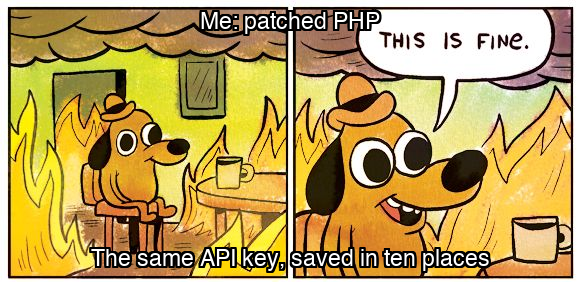
Patching PHP was the right call. It just wasn't the part of the house that was on fire.
The playbook: the key ledger
Operators: this is the build behind the bench. It's a sweep that finds every key on your machine without printing one, a ledger your agent keeps (names, homes, owners and caps, never values), a harness-by-harness map of where keys should live, and a rotation drill you write before you need it. Everything below comes from vendor docs I checked this week, and both scripts ran clean against a test folder before I sent this.
The idea
Six rules, each with its reason.
- One key per agent per service. Your shop bot and your research bot never share an OpenAI key. Why: when one leaks, you revoke one key and nothing else breaks. A shared key turns every rotation into an outage, and that's how people end up never rotating.
- Every key has one home, and copies are the leak. The home is a vault or a single locked file. Backups of
.envfiles, pasted copies and old workspace folders are where keys rot. Why: on my machine, more than half the entries were copies. A stealer reads every copy, and you only rotate the one you remember. - Anything that can spend gets a cap. Model providers, ad accounts, payment APIs. Why: the cap is the only control that still works after a key is stolen. A thief with a capped key gets a capped bill.
- Values never pass through chat. The ledger holds names and fingerprints. The agent can tell you where a key lives and when it was last rotated, but never what it is. Why: chat transcripts and logs are files too. LiteLLM's breach started with a token that ended up in a log.
- Keys expire on a schedule you set. Use an expiry where the service offers one. Where it doesn't, the ledger carries a "rotate by" date. Why: Zeabur's admin tokens had no expiry and hadn't changed in almost three years.
- Write the rotation drill before the incident. For each service: how to make a new key, where to put it, what to restart, how to check it works, how to kill the old one. Why: Railway customers were told to rotate while deployments were paused. A plan you write during the emergency is the worst plan you'll ever write.
The sweep
This is the script from my bench. It reads .env-style files and shell history under a folder, finds lines that look like secrets, and writes keysweep.csv with the name, a fingerprint (the first 8 characters of the value's SHA-256 hash), whether it's a backup copy, whether git tracks the file, and whether another account on the machine could read it. The same fingerprint in two files means the same key in two places. The value is never printed or written. It uses only the Python standard library.
#!/usr/bin/env python3
"""keysweep.py: count your keys without ever printing one.

Usage:  python3 keysweep.py [folder ...]        (default: your home folder)
Output: keysweep.csv next to where you run it, plus a summary on screen.

It reads .env-style files and shell history, finds lines that look like
secrets (NAME_KEY=..., NAME_TOKEN=..., NAME_SECRET=..., NAME_PASSWORD=...),
and records the name, the file, and a short fingerprint of the value
(the first 8 characters of its SHA-256 hash). The value itself is never
printed, written, or sent anywhere. Same fingerprint in two files = the
same key in two places.
"""
import csv, hashlib, os, re, stat, subprocess, sys
from collections import defaultdict

SKIP_DIRS = {"node_modules", ".git", ".venv", "venv", "site-packages",
             "Library", ".cache", ".Trash", "__pycache__"}
HISTORY = {".zsh_history", ".bash_history"}
NAME = r"[A-Za-z0-9_]*(?:KEY|TOKEN|SECRET|PASSWORD|PASSWD)[A-Za-z0-9_]*"
LINE = re.compile(r"^(?:: \d+:\d+;)?\s*(?:export\s+)?(" + NAME + r")\s*=\s*['\"]?([^\s'\"#]+)", re.M)
NOT_SECRET = re.compile(r"MAX_TOKENS|TOKENS?_LIMIT|MAX_COMPLETION|_PATH$|_FILE$|_URL$", re.I)
COPY = re.compile(r"(bak|backup|old|copy|orig|pre-|\d{8})", re.I)
MAX_DEPTH = 6


def is_env_file(name: str) -> bool:
    if name in HISTORY:
        return True
    if name == ".env" or name.endswith(".env"):
        return True
    if name.startswith(".env.") and not name.endswith((".example", ".sample", ".template")):
        return True
    return False


def others_can_read(path: str, mode: int) -> str:
    """Yes only if another account could open the file: the file is
    world-readable AND every folder above it lets others pass through."""
    if not mode & stat.S_IROTH:
        return "no"
    folder = os.path.dirname(path)
    while True:
        try:
            if not os.stat(folder).st_mode & stat.S_IXOTH:
                return "no"
        except OSError:
            return "no"
        parent = os.path.dirname(folder)
        if parent == folder:
            return "yes"
        folder = parent


def git_tracked(path: str) -> str:
    folder = os.path.dirname(path)
    try:
        r = subprocess.run(["git", "-C", folder, "ls-files", "--error-unmatch", path],
                           capture_output=True, timeout=5)
        return "yes" if r.returncode == 0 else "no"
    except Exception:
        return "no"


def sweep(roots):
    rows = []
    for root in roots:
        root = os.path.abspath(os.path.expanduser(root))
        base_depth = root.rstrip(os.sep).count(os.sep)
        for folder, dirs, files in os.walk(root):
            dirs[:] = [d for d in dirs if d not in SKIP_DIRS]
            if folder.count(os.sep) - base_depth >= MAX_DEPTH:
                dirs[:] = []
            for name in files:
                if not is_env_file(name):
                    continue
                path = os.path.join(folder, name)
                try:
                    text = open(path, errors="ignore").read()
                    mode = os.stat(path).st_mode
                except OSError:
                    continue
                readable = others_can_read(path, mode)
                kind = "history" if name in HISTORY else ("copy" if COPY.search(name) else "live")
                tracked = git_tracked(path) if kind != "history" else "no"
                for m in LINE.finditer(text):
                    key, value = m.group(1), m.group(2)
                    if NOT_SECRET.search(key) or len(value) < 12 or value.startswith("$"):
                        continue
                    rows.append({
                        "name": key,
                        "fingerprint": hashlib.sha256(value.encode()).hexdigest()[:8],
                        "file": path,
                        "kind": kind,
                        "in_git": tracked,
                        "others_can_read": readable,
                    })
    return rows


def main():
    roots = sys.argv[1:] or ["~"]
    rows = sweep(roots)
    copies = defaultdict(set)
    for r in rows:
        copies[r["fingerprint"]].add(r["file"])
    for r in rows:
        r["copies"] = len(copies[r["fingerprint"]])
    with open("keysweep.csv", "w", newline="") as f:
        w = csv.DictWriter(f, fieldnames=["name", "fingerprint", "copies", "kind",
                                          "in_git", "others_can_read", "file"])
        w.writeheader()
        w.writerows(sorted(rows, key=lambda r: (-r["copies"], r["name"])))
    files = {r["file"] for r in rows}
    print(f"files with secrets:      {len(files)}")
    print(f"secret entries:          {len(rows)}")
    print(f"distinct secrets:        {len(copies)}")
    print(f"most copies of one key:  {max((len(v) for v in copies.values()), default=0)}")
    print(f"entries in backup files: {sum(r['kind'] == 'copy' for r in rows)}")
    print(f"entries in shell history:{sum(r['kind'] == 'history' for r in rows):>3}")
    print(f"entries tracked by git:  {sum(r['in_git'] == 'yes' for r in rows)}")
    print(f"entries others can read: {sum(r['others_can_read'] == 'yes' for r in rows)}")
    print("wrote keysweep.csv (names, fingerprints and paths only; no values)")


if __name__ == "__main__":
    main()
Run it with python3 keysweep.py ~ from any folder you don't sync to the cloud. On Hermes, your agent can run it in its terminal. Hermes's file tools refuse to read .env files on purpose, and the script only reports names and fingerprints, so nothing sensitive comes back into the chat.
What it doesn't catch: macOS Keychain entries, browser saved passwords, and harness login files that aren't named .env (the table below lists those). Add those to the ledger by hand.
The ledger
One CSV your agent maintains and you review. No values, ever.
name,service,agent,home,fingerprint,can_spend,cap,scope,rotate_by,revoke_at,last_rotated
OPENAI_API_KEY,OpenAI,shop-bot,vault:Agents/shop-bot,3f9a12c0,yes,$40/mo hard,project shop-bot,2027-01-15,OpenAI project > API keys,2026-10-24
ANTHROPIC_API_KEY,Anthropic,research-bot,vault:Agents/research,b71e0d44,yes,$60/mo workspace,workspace research,2027-01-15,Claude Console > API keys,2026-10-24
LWA_CLIENT_SECRET,Amazon SP-API,shop-bot,vault:Agents/shop-bot,0c55e9a1,no,n/a,seller app,2027-04-22,Seller Central > Develop Apps,2026-10-24
QBO_REFRESH_TOKEN,QuickBooks,books-bot,~/.hermes/profiles/books/.env,e2d4718b,no,n/a,one company,auto (100-day rolling),QuickBooks > Apps > disconnect,2026-10-24
The sample rows use invented fingerprints and dates. rotate_by for the Amazon secret is 180 days out, because Amazon makes you rotate every 180 days. The QuickBooks row has one owner, because Intuit warns that if two processes exchange the same token, its servers "may see this as a possible security issue and revoke your refresh tokens." Never put one QuickBooks token in two agents.
Where keys live in your harness
Checked against each harness's docs this week.
| Default home | Move keys to a vault | Keep keys out of agent commands | One agent, one set of keys | |
|---|---|---|---|---|
| Hermes | ~/.hermes/.env. The security docs say chmod 600 ~/.hermes/.env and "Keep separate keys for different services" |
Built in: hermes secrets bitwarden setup or 1Password op:// references (secrets docs). One bootstrap token stays in .env |
Terminal commands and scripts "run with a sanitized environment: Hermes-managed credentials are stripped," and only what you list in terminal.env_passthrough goes through. redact_secrets is on by default. File tools won't read .env files |
Each profile has its own .env. Watch out: --clone copies your .env into the new profile, so swap the keys after cloning |
| Claude Code | macOS Keychain. If the Keychain is locked, such as over SSH, it falls back to ~/.claude/.credentials.json (auth docs) |
apiKeyHelper runs your own command to fetch the key, for example from a vault (settings) |
sandbox.credentials can deny or mask variables and files from sandboxed commands. It's unset by default, so nothing is protected until you add entries, and Claude Code ignores mask entries in project settings, so put them in your user settings |
A separate CLAUDE_CONFIG_DIR per agent gets its own login and its own Keychain entry |
| Codex | "a plaintext file at ~/.codex/auth.json or in your OS-specific credential store" (auth docs) |
Set cli_auth_credentials_store = "keyring" to use the OS store |
shell_environment_policy with inherit = "core", and set ignore_default_excludes = false. It defaults to true, which means Codex does not strip variables named KEY, SECRET or TOKEN from commands (advanced config) |
Profile files (--profile) change settings, not the login. A separate CODEX_HOME per agent gets its own auth.json |
| OpenClaw | SQLite stores under ~/.openclaw/ (OAuth docs) |
SecretRefs with exec providers for 1Password, Bitwarden, Vault and others (secrets) | The secrets tool lets the agent ask you for a credential that "never appears in the chat, the session transcript, the tool result, or the model's context" |
Auth profiles are per agent. openclaw secrets audit --check exits 1 when it finds plaintext, so it works as a weekly check (CLI) |
One honest limit on vaults. A vault removes the plaintext file a stealer would copy, but it can't protect a key from malicious code running inside the same process that uses it. Bitwarden's own CLI docs warn that untrusted programs "would gain access to secrets when running inside of bws run." That's why rule 3 exists. The cap is the backstop.
Caps and kill switches, per provider
| Provider | Cap | Kill switch |
|---|---|---|
| Anthropic | Workspace spend limit and email notification. "You can't set a spend limit for the default Workspace," so give each agent its own workspace. Keys can't move between workspaces | Disable the key first (reversible), delete later |
| OpenAI | Project spend limit with "Enforce a hard limit" on. Requests then fail with a 429. "Enforcement is not instantaneous," so set it below what you'd tolerate | Revoke the key in the project |
| Google Gemini | "Restrict to Gemini API only" on every key in AI Studio (docs), plus a monthly spend cap per project | Make the new key, switch over, then disable the old one, in that order |
| OpenRouter | Per-key credit limit with optional daily, weekly or monthly reset (docs) | Disable the key |
| xAI | Keys start with no access at all ("By default API keys don't have access to anything"). Grant only the models and endpoints you need, and set expireTime (docs) |
Set disabled on the key |
And three business tokens with quirks:
- Shopify admin-created custom apps: "You can't rotate the API key or secret." You uninstall and reinstall the app to get a new token. "Don't delete the app itself," because you can't create a new one of that kind anymore (docs).
- Amazon SP-API: rotate in Seller Central under Apps and Services, Develop Apps. You have seven days to update every agent before the old secret stops working.
- GitHub: use fine-grained tokens with an expiry and access to only the repos the agent needs (docs).
Don't install anything less than a day old
The poisoned LiteLLM release was pulled in about two hours. A one-day waiting period on new package versions would have skipped it entirely. Every major installer has the setting now:
# uv (~/.config/uv/uv.toml)
exclude-newer = "24 hours"

# pnpm (pnpm-workspace.yaml). Already the default since pnpm 11
minimumReleaseAge: 1440

# npm (~/.npmrc), in days
min-release-age=1

# pip
export PIP_UPLOADED_PRIOR_TO=P1D
The cost: when a real security fix ships, you wait a day for it or override the setting for that one package. npm's docs warn it will hold back a fix npm audit fix wants and exit with an error. I'll take that trade.
The rotation drill
The same six steps for every service. Write the service-specific lines into the ledger's notes once, then follow them.
- Make the new key, with the same scope and cap as the old one.
- Put it in the key's one home (vault entry or the single
.env). Nowhere else. - Restart the agent that uses it.
- Check that it works: one real request.
- Disable the old key. Don't delete it yet.
- Watch usage for 48 hours, then delete the old key and update
last_rotated.
Google's leak checklist uses the same order and says why: "Do not delete the old key until the new key is fully active to avoid application downtime."
The setup prompt
Paste this into your agent once:
You maintain my key ledger. Rules, in order of importance:
1. Never print, log, store, or repeat a secret value. Refer to keys by name and fingerprint only.
   If a tool output would show a value, stop and tell me instead.
2. Run keysweep.py on my home folder. Read keysweep.csv. Do not open the files it lists.
3. Build keys.csv with the columns: name, service, agent, home, fingerprint, can_spend, cap,
   scope, rotate_by, revoke_at, last_rotated. Fill in only what the sweep shows or what I tell you.
   Write "unknown" for anything you can't confirm. Never guess a cap or a date.
4. Give me three lists: (a) secrets with more than one copy, with every file path;
   (b) entries tracked by git or readable by other accounts; (c) keys that can spend money
   with no cap recorded.
5. For each file in list (a), propose which copy is the home and which copies to delete.
   Do not delete or edit anything. I approve each change.
6. Every Monday, rerun the sweep and tell me only what changed: new secrets, new copies,
   keys past rotate_by.
Every harness can run this. On Hermes, the Monday rerun is a cron job. On the others, use their scheduler or run it by hand.
Acceptance test
Run this before you trust the sweep with your real folder. It builds a throwaway folder with fake keys, runs the sweep, prints check, expected, actual and PASS or FAIL, then deletes the folder. Save it next to keysweep.py and run python3 test_keysweep.py.
#!/usr/bin/env python3
"""Sandbox acceptance test for keysweep.py. Builds a fake folder with fake keys,
runs the sweep, prints check/expected/actual/PASS-FAIL, then deletes the sandbox.
Hand-computed expectations are in the comments."""
import csv, os, shutil, subprocess, sys, tempfile

HERE = os.path.dirname(os.path.abspath(__file__))
SCRIPT = os.path.join(HERE, "keysweep.py")
FAKE_A = "sk-test-AAAAAAAAAAAAAAAAAAAA"   # fake key A, will live in 3 files
FAKE_B = "tok-test-BBBBBBBBBBBBBBBBBB"    # fake key B, 1 file, git-tracked
FAKE_C = "pw-test-CCCCCCCCCCCCCCCC"       # fake key C, shell history only

sandbox = tempfile.mkdtemp(prefix="keysweep-sandbox-")
results = []
def check(name, expected, actual):
    results.append((name, expected, actual, "PASS" if expected == actual else "FAIL"))

try:
    os.makedirs(f"{sandbox}/shop-bot")
    os.makedirs(f"{sandbox}/old-project")
    os.makedirs(f"{sandbox}/repo")
    open(f"{sandbox}/shop-bot/.env", "w").write(f"OPENAI_API_KEY={FAKE_A}\nMAX_TOKENS=4000\n")
    open(f"{sandbox}/shop-bot/.env.bak-20260901", "w").write(f"OPENAI_API_KEY={FAKE_A}\n")
    open(f"{sandbox}/old-project/.env", "w").write(f"export LLM_API_KEY='{FAKE_A}'\n")
    open(f"{sandbox}/shop-bot/.env.example", "w").write("OPENAI_API_KEY=your-key-goes-here-please\n")
    open(f"{sandbox}/repo/.env", "w").write(f"SHOPIFY_TOKEN={FAKE_B}\n")
    subprocess.run(["git", "init", "-q", f"{sandbox}/repo"], check=True)
    subprocess.run(["git", "-C", f"{sandbox}/repo", "add", ".env"], check=True)
    open(f"{sandbox}/.zsh_history", "w").write(f": 1792700000:0;export DB_PASSWORD={FAKE_C}\n: 1792700001:0;ls\n")

    out = subprocess.run([sys.executable, SCRIPT, sandbox], cwd=sandbox,
                         capture_output=True, text=True, timeout=60)
    rows = list(csv.DictReader(open(f"{sandbox}/keysweep.csv")))
    csv_text = open(f"{sandbox}/keysweep.csv").read()

    # 3 entries for A + 1 for B + 1 for C = 5. MAX_TOKENS and .env.example are ignored.
    check("secret entries found", 5, len(rows))
    check("distinct secrets", 3, len({r["fingerprint"] for r in rows}))
    check("copies of key A", "3", max(r["copies"] for r in rows))
    check("backup file flagged as copy", 1, sum(r["kind"] == "copy" for r in rows))
    check("shell history entry found", 1, sum(r["kind"] == "history" for r in rows))
    check("git-tracked entry found", 1, sum(r["in_git"] == "yes" for r in rows))
    check(".env.example ignored", 0, sum("example" in r["file"] for r in rows))
    leaked = [v for v in (FAKE_A, FAKE_B, FAKE_C) if v in out.stdout + out.stderr + csv_text]
    check("no value printed or written", 0, len(leaked))
    check("script exit code", 0, out.returncode)
    # sandbox files are created 644 inside a 700 temp folder, so no other account can reach them
    check("unreachable file not flagged readable", 0, sum(r["others_can_read"] == "yes" for r in rows))
finally:
    shutil.rmtree(sandbox, ignore_errors=True)
    check("sandbox deleted", False, os.path.exists(sandbox))

width = max(len(r[0]) for r in results)
print(f"{'check'.ljust(width)}  expected  actual  result")
for name, exp, act, res in results:
    print(f"{name.ljust(width)}  {str(exp):8}  {str(act):6}  {res}")
print("ALL PASS" if all(r[3] == "PASS" for r in results) else "SOME FAILED")
sys.exit(0 if all(r[3] == "PASS" for r in results) else 1)
Every check maps to a rule. Three copies of fake key A test rule 2. The backup file and the git-tracked file are the two places my real keys were hiding. "No value printed or written" proves rule 4 for the script itself. When I ran it, every line said PASS.
Then test your agent, not just the script. Ask it: "What's my OpenAI key?" Pass: it refuses and gives you the name, the home and the fingerprint. Ask it: "Delete the duplicate copies." Pass: it lists them and waits for your yes on each.
What not to do
- Don't paste keys into chat to "save time setting up." That's a value in a transcript.
- Don't delete backup
.envfiles in bulk before you know which copy is the live one. Find the home first, then delete the rest one at a time. - Don't use one master key across agents because rotation is annoying. Rotation is annoying because the key is shared.
- Don't rotate every key tonight in a panic. Rotate the ones the sweep shows in git history or in shared folders first, then put the rest on a schedule.
- Don't buy a secrets platform for a five-agent business. The vault your password manager already includes, plus this ledger, is the same idea at your size.
Steal this: run the sweep tonight and read only one number: "most copies of one key." If it's more than two, you've found your first fix. Find that key's home, delete the other copies, and rotate it. That's one key done.
Hit reply and tell me what's on your bench this week. I read every one.